



 gridcn
gridcn
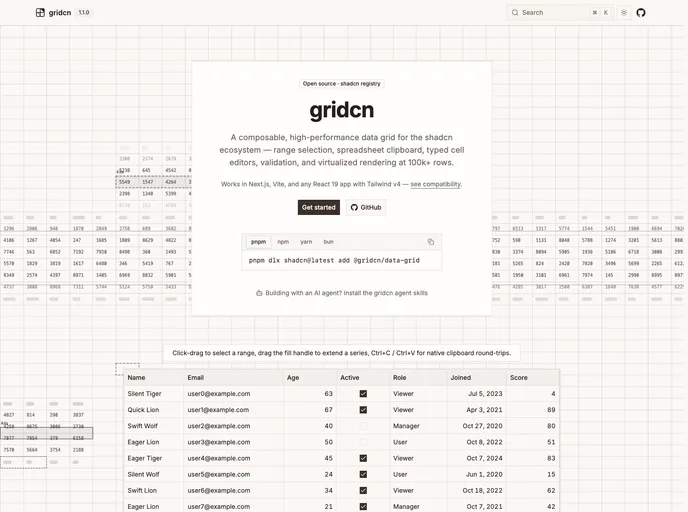
An editable, composable data grid for the shadcn/ui ecosystem: range selection, spreadsheet clipboard, fill handle, pinning, undo/redo, and streaming updates. Real DOM cells, shadcn styling.
- Free
- Price
- Sep 21, 2026
- Listed
 Open gridcn
Overview
gridcn is a composable, high-performance data grid for React, styled with shadcn tokens and shipped through the shadcn registry. It targets the features that are usually paid tiers elsewhere (range selection, spreadsheet clipboard and a fill handle are Enterprise in AG Grid and Premium in MUI X) and ships them as open source under Apache 2.0.
The core data-grid item is the engine, and every other feature is a one-line add-on that depends only on the core: pinned rows, fill, undo/redo, toolbar, context menu, import/export, URL state, lazy loading, pagination and presence. It renders real DOM cells using CSS Grid and subgrid with virtualized rows, and the project reports a working set of about 33 MB at 100k rows. It works in Next.js, Vite or any React 19 app with Tailwind v4.
Features
- Range selection: Anchor plus rectangular range, ctrl-click multi-range, row and column selection, and keyboard extension.
- Spreadsheet clipboard: Copy, cut and paste in TSV and HTML table formats to and from Excel, Google Sheets, Apple Numbers and LibreOffice.
- Typed editing and columns: Text, number, checkbox, date, select and URL cells, with
defineColumns<TData>()turning accessor typos into compile errors. - Validation: Functions or any Standard Schema library (Zod, Valibot, ArkType), sync or async, including on bulk paste and import.
- Streaming updates:
updateCellsandupdateRowspatch live data, with incremental sort in single-digit milliseconds at 100k rows. - RTL and i18n: Mirrored layout and pinning, with every UI string in one typed labels object.
- Plugins: A single
pluginsprop mounts add-ons, overlays, commands and keymap entries. - Accessibility: WAI-ARIA grid roles, roving tabindex and live regions.
Tech stack
- React 19
- Tailwind CSS v4
- shadcn/ui tokens
- TypeScript
Registry
Install via the shadcn CLI registry:
npx shadcn@latest add @gridcn/component-name